Free invoice template — Excel, Word and PDF
Download a ready-made invoice template, fill it in and send it. All three files are free, need no registration, and follow the Georgian invoice layout: tax ID fields, 18% VAT line, bank details with IBAN and SWIFT, signature and stamp area. Georgian version: ინვოისის შაბლონი.
What the template looks like
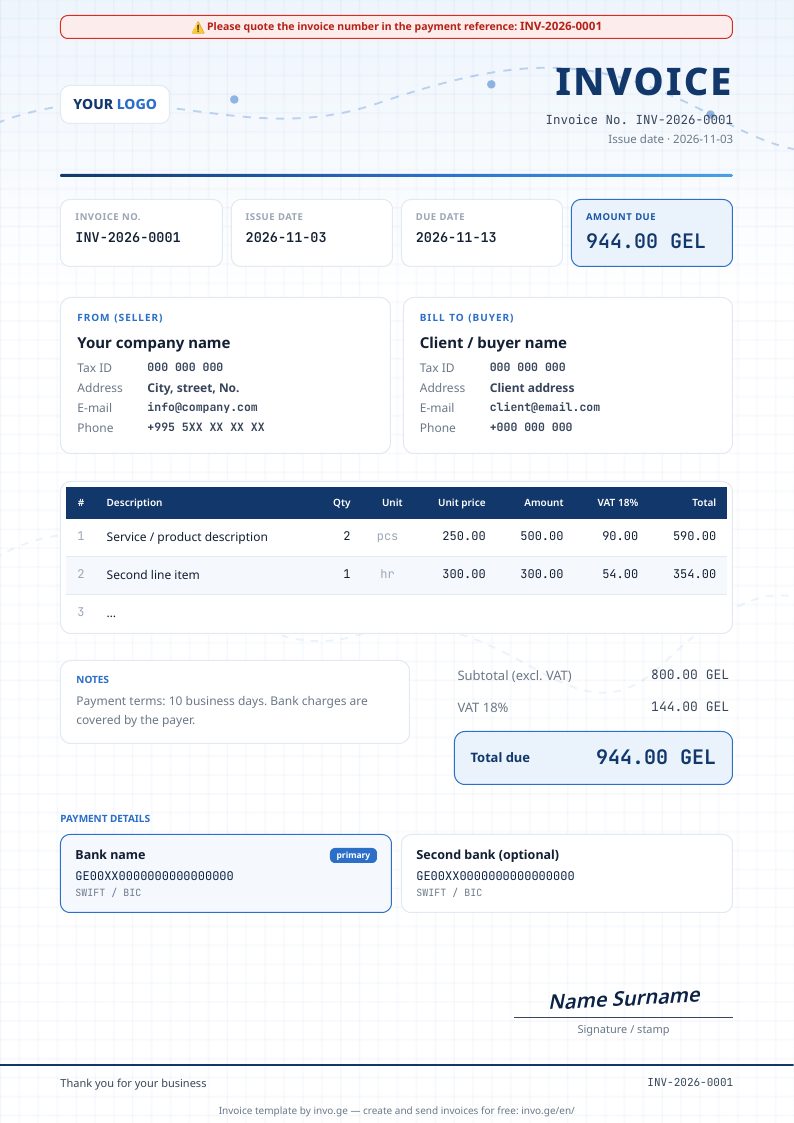
This is the exact design INVO.GE generates for its users — with the amount-due box, payment reference banner, bank cards and signature/stamp area.
Fields in the template
| Field | Why it is there |
|---|---|
| Invoice number, issue date, due date | Sequential numbering is expected by accountants and the Revenue Service; the due date makes the payment term explicit. |
| Seller: name, tax ID (ს/კ), address, e-mail, phone | Identifies you as a Georgian taxpayer. |
| Buyer: name, tax ID, address, contacts | Needed for the buyer's own accounting and for the RS.ge tax invoice. |
| Line items: description, quantity, unit, unit price, amount, VAT, total | Shows exactly what is billed; VAT is calculated per line. |
| Subtotal, VAT 18%, total due | VAT-registered sellers must show VAT separately; non-VAT sellers set the rate to 0. |
| Bank details: bank name, IBAN, SWIFT/BIC | So the client can pay — Georgian IBANs start with GE. |
| Payment reference banner | Asking the client to quote the invoice number makes bank matching reliable. |
| Signature / stamp | Optional in Georgia for most invoices, but many clients still expect it. |
How to fill it in — 5 steps
- Replace the logo placeholder and the seller block with your company details and tax ID.
- Give the invoice a number (for example INV-2026-0001) and set the issue and due dates.
- Fill in the client's name and tax ID; for foreign clients use their VAT/registration number.
- Add line items — in Excel only quantity and unit price are typed; the rest is calculated. Set the VAT cell to 0 if you are not VAT-registered.
- Check the bank details, save as PDF and send it. Keep a copy and continue the numbering on the next invoice.
Template or online platform?
| Excel / Word template | INVO.GE free account | |
|---|---|---|
| Price | Free | Free — 30 invoices a month |
| Numbering | Manual | Automatic |
| Sending | Attach the PDF yourself | E-mail or link, with viewed/paid status |
| Knowing who paid | Check the bank manually | Bank payments matched automatically |
| RS.ge tax invoice and waybill | Retype in RS.ge | One click from the invoice |
| Recurring invoices | Copy the file each month | Scheduled automatically |
Frequently asked questions
Is the invoice template free?
Yes. The Excel, Word and PDF templates are free to download and use, with no registration, for any business.
Which fields must a Georgian invoice contain?
Invoice number and date, due date, seller name and tax ID (ს/კ), buyer name and tax ID, a description of goods or services with quantity and unit price, the VAT amount if the seller is VAT-registered, the total, and bank details for payment.
Does the Excel template calculate VAT?
Yes. Enter quantity and unit price per line; the amount, 18% VAT and total are calculated by formulas. Set the VAT rate cell to 0 if you are not VAT-registered.
Is a template enough for RS.ge?
No. A template produces the commercial invoice (PDF). The Georgian tax invoice (ანგარიშ-ფაქტურა) and waybill must be created in the RS.ge system — INVO.GE does that from the invoice with one click, on the free plan too.
Can I put my logo on it?
Yes — the Word and Excel templates have a logo placeholder at the top left; replace it with your image.